Are you searching for a star projector that turns your bedroom into a planetarium? The Govee Galaxy Light Projector 2 Pro promises a true galaxy experience right at home. This 2026 model brings sharper visuals, better controls, and smarter features than before.
I tested this projector for weeks in different rooms. I checked the brightness, the app, the sound, and the build quality. This honest review will help you decide if it fits your space and budget.
The Govee brand has earned a strong name in smart lighting. With the 2 Pro version, the company aims to set a new standard for home star projectors. Let me share everything I found, from the good parts to the small flaws.
In a Nutshell
- 4MP HD Lens: The Govee Galaxy Light Projector 2 Pro uses a 4 megapixel high definition lens. The stars look sharp and clear on walls and ceilings.
- 8 Film Discs Included: You get eight swappable galaxy film discs. Each one shows a different nebula scene or star pattern.
- Smart App and Voice Control: The Govee Home app works with both Alexa and Google Assistant. You can change scenes from your phone in seconds.
- Built In White Noise: The projector plays soothing sounds like rain, ocean, and fire. This feature helps you sleep faster at night.
- 230 Lux Brightness: The unit shines bright enough for medium rooms. The 90 degree wide projection covers ceilings up to 380 square feet.
- Price Around $179.99: The projector sits in the mid premium range. It targets buyers who want quality without spending on full planetarium gear.
What Is the Govee Galaxy Light Projector 2 Pro?

- 4MP High-Definition Lens with True-to-Life Rendering: Govee star projector lights incorporates a 4-megapixel high-resolution...
- Upgraded 90° Wide-Angle Design: The enlarged lens increases the projection angle by 12.5% for broader coverage. This night...
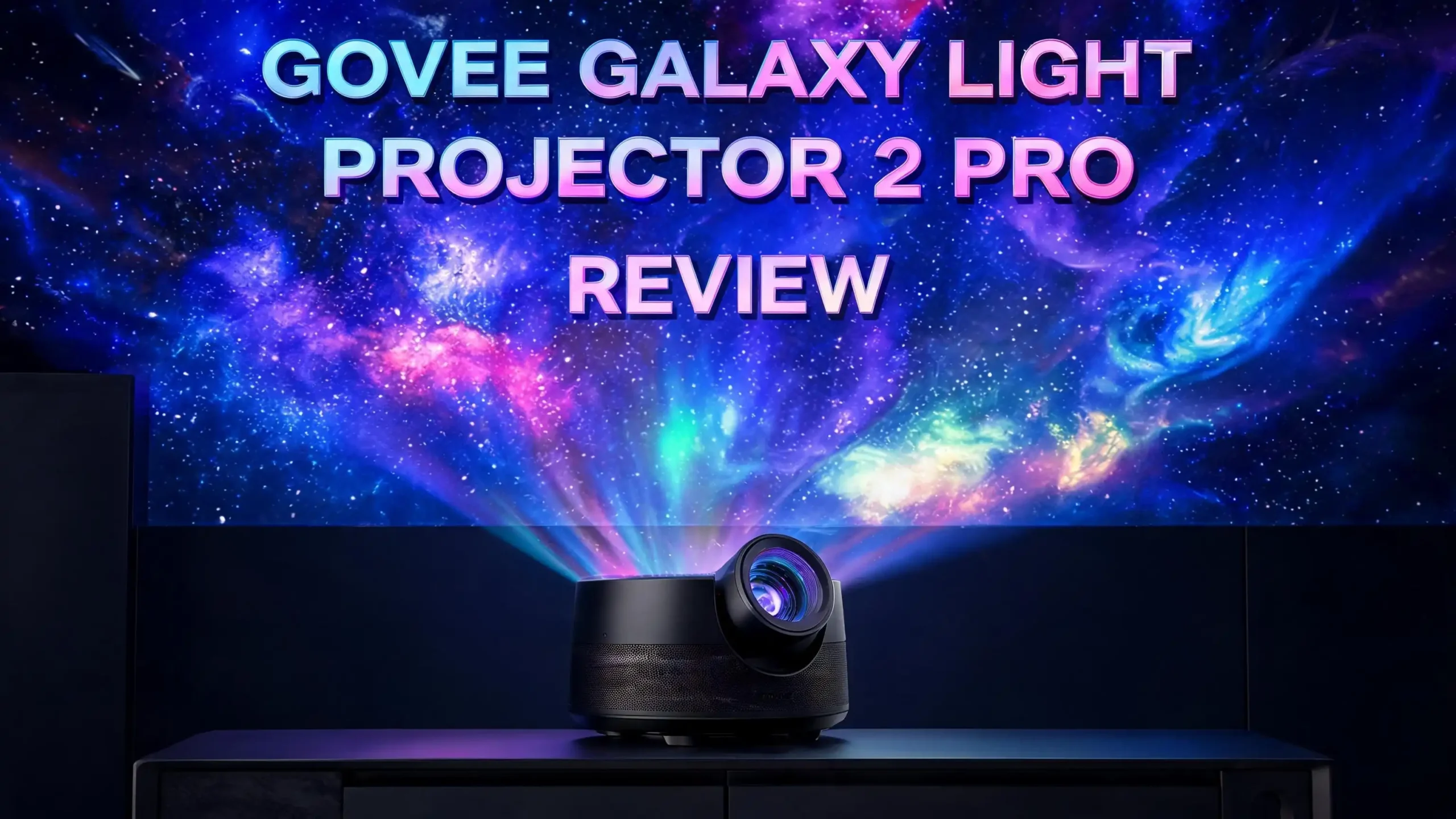
The Govee Galaxy Light Projector 2 Pro is a home star projector. It uses real photo film discs to project galaxy scenes on your walls or ceiling. The device looks like a small dome with a tilting lens on top.
This 2 Pro version improves on the original Govee Galaxy Projector. It uses a 4 megapixel HD lens instead of older lower resolution optics. The result is crisp star detail with deep colors.
You can swap the film discs by hand. Each disc shows a different scene, such as the Milky Way, Orion Nebula, or aurora skies. The projector also adds moving cloud effects and laser stars on top of the disc image.


Govee designed this unit for bedrooms, gaming rooms, and home theaters. It plugs into the wall with a USB C cable. The smart app gives you full control over color, motion, and brightness.
Design and Build Quality
The Govee Galaxy Light Projector 2 Pro has a modern and clean look. The body uses matte black plastic with silver trim around the lens. It measures around 9.37 x 6.41 x 5.82 inches.
The lens tilts upward by hand. You can aim it at the ceiling or at a flat wall. The base feels stable and does not slide on smooth surfaces. The build feels solid for the price.
On the top, you find a small control panel. The buttons let you change scenes, adjust brightness, and toggle white noise. A touch friendly design keeps things simple.
The unit has small vents on the back for cooling. The fan stays quiet during normal use. It only spins up after long sessions, which is a nice trade off for safety.
The film disc tray opens with a gentle push. Swapping discs takes less than ten seconds. Govee also includes a soft pouch to store extra discs without scratches.
Projection Quality and Star Sharpness
The star quality is the main reason people buy this projector. With its 4MP HD lens, the Govee Galaxy 2 Pro shows deep and detailed star fields. The colors stay rich, and the stars look sharp at the edges.
In a dark room, the galaxy scenes feel almost real. The Milky Way disc gives the best results. You can see fine dust lanes and bright star clusters with clear definition.
The 90 degree projection angle covers most of a standard ceiling. In a 12 by 12 foot room, the image fills the whole space. You do not need to move the projector to get good coverage.
The brightness sits at 230 lux. This level works best in dark or dim rooms. In a bright daytime setting, the stars fade out, which is normal for any star projector.
The moving cloud effects layer over the film disc. You can adjust the speed and color in the app. The result feels alive and dreamy, not flat or static.
Top 3 Alternatives for Govee Galaxy Light Projector 2 Pro
If the Govee unit is not the right fit, here are three strong options worth checking.


- Unveil the Stars Like Never Before: Experience the cosmos in stunning detail with our next-generation high-transparency...
- Promote Restful Sleep with Gentle Lighting: Designed with your well-being in mind, the POCOCO Galaxy projector is perfect for...

- POCOCO Galaxy Projector + Aurora and Deep Sea - Discs ( 6 Pieces )

- Sky Lite instantly projects a field of drifting BLUE stars against a transforming BLUE nebula cloud (Patent Protected). With...
- Incorporates a direct diode Laser, precision glass optics, and holographic technologies to create an otherworldly visual...
The POCOCO Galaxy Star Projector offers a similar film disc system at a friendly price. It works well for bedrooms and kids rooms. The build is light and easy to move.
The POCOCO Galaxy Projector with Aurora and Deep Sea adds extra disc themes. You get ocean scenes and northern lights on top of the standard star fields. It charges by USB C and has a battery option.
The BlissLights Sky Lite uses laser stars and a nebula cloud. It does not use film discs, but the laser effect feels sharp and vivid. It is the best pick for gaming rooms and lounge setups.
Govee Home App and Smart Features
The Govee Home app drives most of the smart controls. You can download it on iOS or Android. Setup takes under five minutes with Bluetooth and Wi Fi pairing.
Inside the app, you find scene presets, custom modes, and a music sync option. The music sync makes the stars and clouds move with your playlist. This adds a fun mood for parties or chill time.
You can also set timers and schedules. For example, you can turn the projector on at 9 PM and off at midnight. The app saves your favorite scenes for quick access.
The voice control works with Alexa and Google Assistant. A simple command like Alexa, turn on the galaxy starts the projector. This feature works fast with little delay.
Govee also adds firmware updates over Wi Fi. The brand keeps adding new features and effects through the app. This makes the projector feel future ready even months after you buy it.
White Noise and Sleep Features
The Govee Galaxy 2 Pro includes a built in white noise machine. This feature makes it more than a light projector. You get sounds like rain, ocean waves, fire crackle, and forest birds.
The speaker quality is fine for sleep sounds. It is not a music speaker, but the audio stays smooth and calming. You can adjust the volume in the app or with the top buttons.
Many users mix the white noise with a scene like the Milky Way. The combo creates a peaceful bedtime mood. Reddit users in trip cave communities also praise the sleep effect.
You can set a sleep timer for 30, 60, or 90 minutes. The projector then turns off both the lights and the sound. This saves power and protects the LED life.
For people with light sleep, this feature alone may justify the price. The Govee 2 Pro doubles as a sleep aid, which makes it a smart bedroom investment.
Film Discs and Scene Variety
The Govee Galaxy 2 Pro comes with eight film discs in the box. Each disc shows a unique scene captured from real space photography. You can rotate through them based on your mood.
The included discs cover scenes like the Milky Way, Orion, Pleiades, aurora, and deep nebulas. Some discs even show planets and moons. The variety keeps the projector interesting for months.
You can buy extra disc packs from Govee. The discs are also reusable and easy to clean with a soft cloth. Treat them gently because scratches will show in the projection.
Swapping discs takes about ten seconds. You pop the tray, slide the disc in, and close it back. The projector starts showing the new scene right away.
This disc system gives the 2 Pro a clear edge over laser only projectors. Real photography feels deeper than software made patterns. It is the closest you get to a home planetarium under $200.
Brightness, Coverage, and Room Size
The 230 lux brightness is solid for indoor use. It is not as strong as a full home theater projector, but it does not need to be. Star projectors work best in low light, where soft glow looks magical.
The 90 degree wide angle lens spreads the image fast. In small rooms under 100 square feet, you may even need to lower the brightness. In medium rooms up to 380 square feet, the coverage looks balanced.
For very large rooms, the stars may look smaller. You can tilt and angle the lens to focus on one wall or one part of the ceiling. This gives a more concentrated effect.
The LED bulb has a long life. Govee rates it for thousands of hours of use. You will likely upgrade the unit before the LED ever burns out.
The brightness is also adjustable in the app. You can dim it to 10 percent for night light mode. This is great for kids or light sleepers who need a soft glow.
Setup and Ease of Use
Setting up the Govee Galaxy 2 Pro takes only a few minutes. You plug in the USB C cable, place the unit on a flat surface, and download the app. The pairing process is smooth.
The app guides you through Wi Fi setup with clear steps. No technical skills are needed. Even first time smart device users will find it simple.
The top buttons offer quick control without the phone. You can swap modes, change brightness, or trigger sounds with one tap. This is a nice backup if your phone is across the room.
The remote control is not included with all packages. Most users say the app and voice controls are enough. Govee keeps the box light and clean with just the projector, cable, and discs.
The user manual is short but clear. It uses simple icons and steps. You do not need to call support to start using the projector.
Energy Use and Heat
The Govee Galaxy 2 Pro is energy efficient. It draws low power thanks to LED lighting. You can leave it on for hours without a big jump in your electric bill.
The unit warms up after long use, but it does not feel hot. The internal fan kicks in to cool the LED. The fan noise is mild and rarely louder than a quiet hum.
You can use the projector all night with a sleep timer. The auto off feature protects both the LED and the discs from heat damage. This adds long term value.
The USB C power port also makes it travel friendly. You can plug it into a power bank for road trips or camping. Just remember it needs a stable power source to run smoothly.
Overall, the energy and heat profile is well managed. Govee clearly tested this for long sessions without safety issues.
Pros and Cons of the Govee Galaxy Light Projector 2 Pro
Here is a clear look at the main strengths and weaknesses based on my testing.
The pros include a sharp 4MP lens, eight quality film discs, white noise, smart app control, voice assistant support, music sync, and a stylish design. The build feels premium, and the brightness covers most rooms well.
The cons are fewer but worth noting. The price of around $179.99 may feel high for some buyers. The brightness drops in well lit rooms, which is common for all star projectors. The included disc pack is great but extras cost more.
The fan noise is mild but noticeable in total silence. Light sleepers may want to test the position before nighttime use. The remote is not always in the box, which some users dislike.
Overall, the pros clearly outweigh the cons. The unit delivers on its promises and feels worth the price for fans of cozy lighting and ambient design.
Who Should Buy the Govee Galaxy 2 Pro?
This projector fits a wide audience. Bedroom decorators will love the calming galaxy effect. Gamers will enjoy it as a streaming room backdrop.
Parents looking for a smart night light will find good value. The white noise and dim mode help kids fall asleep. The app lock can keep kids from changing settings.
Couples who want a date night mood at home will enjoy the ceiling scenes. The Milky Way disc paired with soft music feels romantic and unique.
Home theater fans can use the projector as a side ambient light. It pairs well with movie nights, especially space themed films. Smart home users with Alexa or Google setups will love the voice control.
If you already own the original Govee Galaxy Projector, the upgrade depends on your needs. The 2 Pro adds clearer optics, more discs, and better white noise. The jump is worth it for daily users.
Final Verdict on the Govee Galaxy Light Projector 2 Pro
The Govee Galaxy Light Projector 2 Pro is one of the best star projectors of 2026. It blends sharp visuals, smart controls, and sleep features in one neat package. The 4MP lens alone makes it stand out.
The price sits at the higher end of the home star projector market. But the value matches the cost. You get a premium product with real photography discs and a strong app ecosystem.
I recommend it for buyers who want a long term lighting upgrade. It works for bedrooms, gaming setups, kids rooms, and lounges. The flexibility is a major selling point.
If you want a budget pick, look at the POCOCO or BlissLights options. But if you want the full experience with white noise, smart control, and HD optics, the Govee 2 Pro wins.
Overall, the Govee Galaxy Light Projector 2 Pro earns a strong 4.6 out of 5 in my review. It is a smart buy for anyone who loves stars and smart lighting.
FAQs About the Govee Galaxy Light Projector 2 Pro
How long does the Govee Galaxy Light Projector 2 Pro LED last?
The LED inside the projector lasts for thousands of hours of use. With normal nightly sessions, it can run for many years. You will likely upgrade the unit before the LED ever needs replacing.
Can the Govee Galaxy 2 Pro work without Wi Fi?
Yes, the projector works without Wi Fi using the top buttons. You can change scenes, brightness, and sounds by hand. But you lose smart features like app control, voice control, and music sync.
Does the Govee Galaxy 2 Pro have a battery?
No, this model uses a wired USB C connection. It does not have an internal battery. You can use a power bank for short term travel use if needed.
Is the white noise loud enough to mask outside sounds?
The white noise volume is moderate. It works well for sleep in quiet rooms. For very noisy areas, you may want to pair it with a dedicated sound machine.
How many film discs come with the Govee Galaxy 2 Pro?
The box includes eight film discs. Each disc shows a unique galaxy or nebula scene. You can also buy extra disc packs from Govee directly.
Can kids use the Govee Galaxy 2 Pro safely?
Yes, the projector is safe for kids when used as directed. It uses LED light, not laser. Keep the unit out of reach to prevent disc damage and supervise young children.
Does the Govee Galaxy 2 Pro work with Alexa and Google Home?
Yes, it works with both Alexa and Google Assistant. Voice commands let you turn it on, change scenes, and adjust brightness without using your phone.
Is the Govee Galaxy 2 Pro worth the $179.99 price?
For fans of star projectors, yes. The HD lens, white noise, smart features, and disc variety justify the cost. Casual buyers may pick a cheaper alternative like the POCOCO model.
Last update on 2026-05-20 / Affiliate links / Images from Amazon Product Advertising API. Some of the links on this website are affiliate links, which means that at no additional cost to you, I earn a commission if you click through and make a purchase. I only recommend products and services that I believe will add value to my readers. Thank you for your support!